Estonia Country Pack
A complete Estonian VAT return workflow. A pre-close validation gate runs first — flagging payments without a document, cut-off issues, tax-code/jurisdiction mismatches, GL tie-out differences, and INF-threshold inconsistencies — and blocks generation until they are resolved. It then produces the KMD2 machine CSV (the format e-MTA accepts for upload) plus an XSD-validated vatDeclaration XML carrying the KMD main form and the KMD INF A/B annexes. The EC Sales List (Form VD) for intra-community B2B supplies is a separate filing. Tax codes are dynamically discovered and classified — never hardcoded — so the plugin adapts to your specific setup, including reverse-charge and intra-community acquisition handling and VAT GL reconciliation. A complete Estonian payroll calculation engine that processes gross-to-net for all employees in a payroll run. Applies all Estonian tax formulas: 33% social tax (employer), 22% income tax, 1.6% unemployment insurance (employee), 0.8% unemployment insurance (employer), and funded pension at 2%, 3%, or 6% depending on the employee's tier. Handles the basic tax exemption, pre-tax and post-tax voluntary deductions, and pro-rating for mid-month starts/exits. Generates TSD declaration XML files for direct upload to the EMTA (Estonian Tax and Customs Board) portal. A complete Estonian annual report preparation workflow covering all requirements for filing at ariregister.rik.ee. The plugin auto-determines your company size category (Micro, Small, Medium, or Large) which affects which statements are required. It generates the balance sheet in Annex 1 statutory format, income statement in Scheme 1 (by nature) or Scheme 2 (by function), cash flow statement, statement of changes in equity, notes to financial statements (3 notes for Micro, up to 15 for Medium/Large), management report with KPIs, and profit allocation proposal with statutory reserve calculation. Finally, it produces XBRL files using the et-gaap-2026 taxonomy for direct upload. A comprehensive year-end bookkeeping workflow designed for Estonian companies that need to build or rebuild a full year of accounting. Guides through five phases: Phase 1 sets up the chart of accounts (Estonian conventions), bank accounts, and posting profiles. Phase 2 imports opening balances with subledger detection (AR, AP, fixed assets). Phase 3 processes bank statements month-by-month — creating vendors/customers, classifying transactions, and posting them. Phase 4 fills gaps — missing bills, invoices, and special transactions (depreciation, payroll, tax). Phase 5 reconciles bank accounts, verifies the balance sheet equation, and closes all fiscal periods, preparing the entity for annual report filing.
14 commands.
Nine procedures.
All of them run inside Claude against the governed ledger.
- 01
/prepare-vat-declaration — Run the full monthly VAT return. Discovers and classifies tax codes dynamically, fetches posted transactions, then runs a pre-close validation gate (payments without a document, cut-off, tax-code jurisdiction, GL tie-out, INF threshold) that blocks generation until issues are fixed. Generates the KMD2 machine CSV (e-MTA upload format) plus an XSD-validated vatDeclaration XML with KMD INF A/B annexes. Add "validate" to run the gate only, without generating.
- 02
/prepare-ec-sales-list — Prepare the EC Sales List (Form VD) for intra-community B2B supplies — a separate e-MTA filing. Discovers tax codes indicating IC supply, fetches AR invoices, groups by purchaser VAT number (one row per purchaser, full euros), classifies goods / services / triangular per the official form columns, validates EU VAT numbers via VIES, and reconciles goods with KMD line 3.1.1 and services with line 3.1 − 3.1.1.
- 03
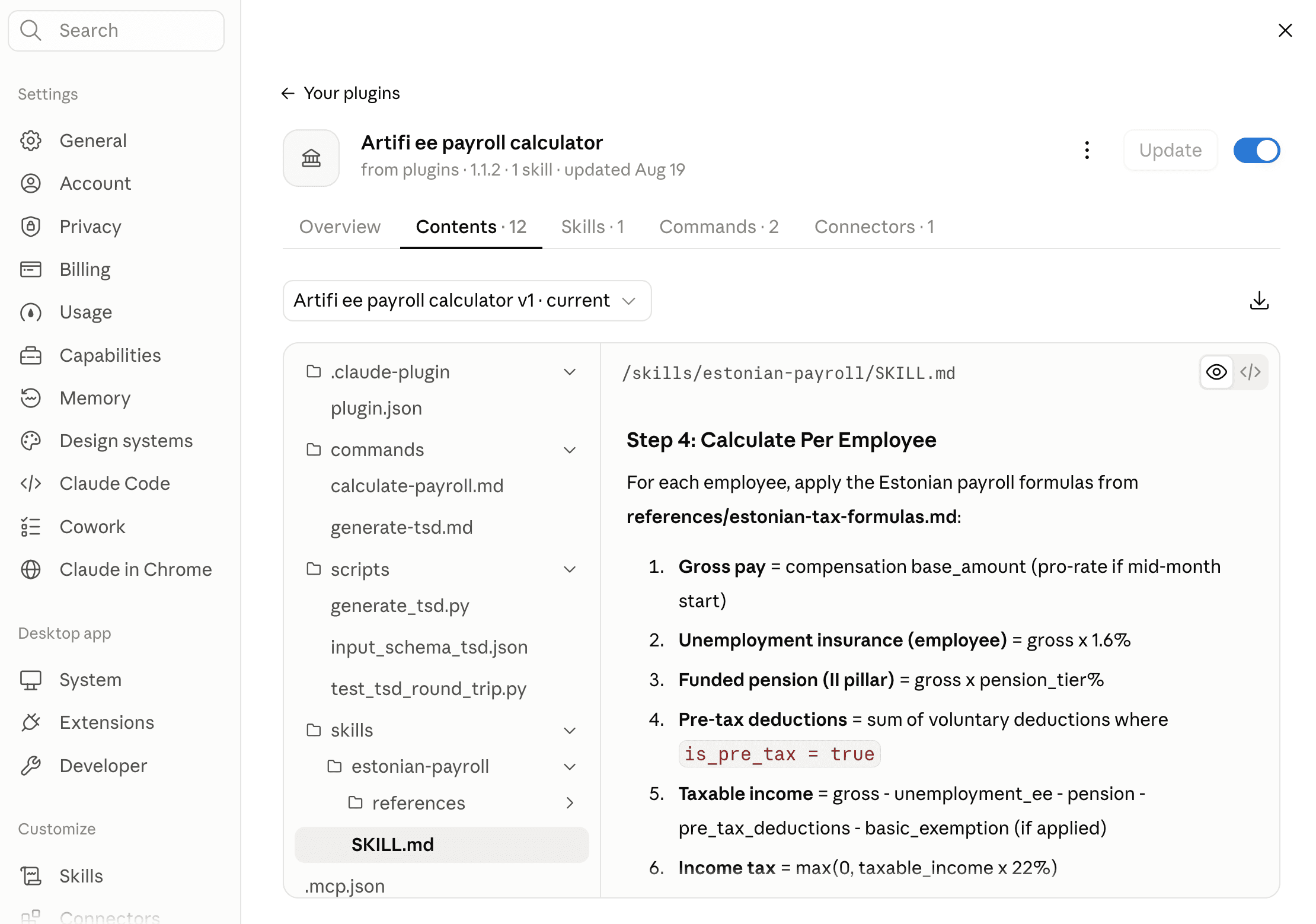
/calculate-payroll — Calculate gross-to-net payroll for all employees in a payroll run. Loads the payroll run, fetches employees with compensation/tax settings/deductions, applies all Estonian tax formulas, validates net pay within 0.02 tolerance, and submits calculated results. Shows summary table with per-employee breakdown.
- 04
/generate-tsd — Generate the Estonian monthly TSD declaration XML for EMTA filing. Fetches calculated payroll data, builds structured JSON input, and runs the generate_tsd.py script to produce validated XML with correct namespace and per-employee data (personal ID, gross pay, income tax, social tax, unemployment, pension).
- 05
/prepare-annual-report — Execute the complete annual report preparation. Verifies year-end close, determines company size, fetches all financial data, compiles balance sheet (Annex 1 format), income statement (Scheme 1 or 2), cash flow, equity changes, notes, management report with KPIs, profit allocation proposal, and XBRL mapping.
- 06
/check-prerequisites — Quickly verify whether a legal entity is ready for annual report preparation. Checks: fiscal period close status, company size classification, audit/review requirement, trial balance verification, and prior year data availability. Returns a status report of any blockers.
- 07
/generate-xbrl-file — Generate XBRL files (.xsd + .xbrl) for upload to ariregister.rik.ee. Builds structured JSON from financial data and runs the generate_xbrl.py script to produce a validated XBRL instance document and companion schema using et-gaap-2026 taxonomy.
- 08
/generate-xbrl-mapping — Generate an account-to-XBRL element mapping table for portal data entry. Creates mapping from your chart of accounts to Estonian GAAP XBRL taxonomy elements. Shows Account Number, Account Name, Balance, XBRL Element, and Report Line.
- 09
/setup-entity — Import chart of accounts (from CSV, Merit Aktiva, or Estonian template), create bank accounts with IBANs, and configure posting profiles for all transaction types. Validates account structure and posting profile completeness.
- 10
/upload-opening-balance — Import and verify opening balances from the prior year balance sheet. Detects subledger accounts (AR 1200-range, AP 2110-range, FA 1500-1599) and asks for individual open items. Validates total debits equal total credits.
- 11
/process-bank-statements — Read bank statements (CSV or PDF), create missing vendors/customers, classify transactions by type, and post them. Processes one month at a time for manageable review. Creates AR/AP payments, expense bills, and revenue invoices.
- 12
/fill-gaps — Identify and post missing source documents — bills without bank payments, invoices without receipts, depreciation entries, payroll postings, tax accruals, and year-end adjustments.
- 13
/reconcile-and-close — Reconcile bank account balances (GL vs bank statement), verify balance sheet equation (A = L + E), close all fiscal periods, and confirm readiness for annual report preparation.
- 14
/check-progress — Review progress across all 5 phases — what is done, what is next, and any issues blocking progress. Shows phase completion status and recommended next step.
Monthly VAT return (KMD2 CSV and XML with the KMD INF annex) and the EC Sales List. Gross-to-net payroll and the TSD declaration for EMTA. Annual report with XBRL for the e-Business Register. A full year of books built from bank statements and source documents.
How a run behaves.
Nine procedures, step by step.
- 01Discover and classify tax codes dynamically — map each to the appropriate KMD line
- 02Fetch all posted AR invoices, AP invoices, credit notes, and journal entries with VAT impact
- 03Verify tax code coverage — flag any transaction lines with missing or inactive tax codes
- 04Run the pre-close validation gate (BLOCK/WARN): payments without a document, cut-off, tax-code jurisdiction, GL tie-out, INF threshold — refuse to generate while any BLOCK is open
- 05Compute the KMD main form: taxable bases by rate, input VAT, reverse charge (lines 6/7), IC acquisitions, adjustments (e-MTA derives total VAT and net payable)
- 06Prepare KMD INF Annex: group sales (Part A) and purchase (Part B) partners above EUR 1,000 threshold
- 07Reconcile the KMD to the GL VAT accounts (trial-balance tie-out)
- 08Generate the KMD2 machine CSV (primary) and XSD-validated vatDeclaration XML with INF A/B annexes — ready for e-MTA upload
- 09Hand off the EC Sales List (Form VD) when intra-community supplies exist; provide filing guidance — deadline is the 20th of the following month
- 01Load payroll run and verify status is "draft"
- 02Fetch all active employees with compensation records, tax settings, and voluntary deductions
- 03Load Estonian tax rates from payroll tax jurisdiction configuration
- 04For each employee: calculate gross pay (pro-rated if mid-month start/exit)
- 05Calculate employee deductions: unemployment insurance (1.6%), funded pension (2%/3%/6%)
- 06Apply pre-tax voluntary deductions
- 07Calculate taxable income = gross - unemployment - pension - pre-tax deductions - basic exemption
- 08Calculate income tax = max(0, taxable income x 22%)
- 09Apply post-tax voluntary deductions
- 10Calculate net pay = gross - all employee taxes and deductions
- 11Calculate employer costs: social tax (33%), employer unemployment (0.8%)
- 12Validate: net pay = gross - total taxes - total deductions (within 0.02 tolerance)
- 13Submit calculation results and show summary table
- 01Fetch calculated or approved payroll run data
- 02Build structured JSON input with per-employee tax details
- 03Run generate_tsd.py script to produce validated XML
- 04Output includes header, summary totals, and Annex 1 per-employee lines
- 05XML ready for upload to e-MTA portal
- 01Check prerequisites & determine company size category (assets, revenue, employees thresholds)
- 02Fetch all financial data: trial balance (current + prior), BS, IS, AR/AP aging, fixed assets, bank accounts, employees
- 03Generate Balance Sheet (Bilanss) in Annex 1 statutory format — validate A = L + E
- 04Generate Income Statement (Kasumiaruanne) in Scheme 1 (by nature) or Scheme 2 (by function)
- 05Generate Cash Flow Statement (Rahavoogude aruanne) for Medium/Large companies using indirect method
- 06Generate Statement of Changes in Equity (Omakapitali muutuste aruanne) for Medium/Large
- 07Generate Notes to Financial Statements (Lisad) — 3 notes for Micro, up to 15 for Medium/Large
- 08Generate Management Report (Tegevusaruanne) with calculated KPIs
- 09Calculate Profit Allocation Proposal — statutory reserve at 5% of net profit until 10% of share capital
- 10Compile complete output with all statements, notes, and management report
- 11Generate XBRL files (.xsd + .xbrl) for upload to ariregister.rik.ee
- 12Provide filing guidance — deadline is 6 months after fiscal year end
- 01Import or create chart of accounts with Estonian conventions
- 02Create bank accounts with IBANs
- 03Configure posting profiles for all transaction types
- 01Upload prior year closing balances
- 02Detect subledger accounts (AR, AP, Fixed Assets)
- 03If details provided: create individual open items
- 04Verify opening balance matches prior year balance sheet
- 01Import bank statements (CSV/PDF) month by month
- 02Create vendors/customers as needed
- 03Classify and post transactions
- 04Match payments to invoices
- 01Post missing bills, invoices, and special transactions
- 02Record depreciation, payroll, and tax entries
- 03Post year-end adjustments
- 01Reconcile bank balances (GL vs statement)
- 02Verify balance sheet equation
- 03Close all fiscal periods
- 04Hand off to annual report plugin
All transactions for the period are posted (no drafts remain). All transaction lines have tax codes assigned. KMD calculations balance: output VAT minus input VAT equals net VAT. KMD INF totals reconcile with KMD output VAT lines. EC Sales List reconciles with KMD Lines 3.1 (goods) and 3.2 (services). Payroll run exists and is in "draft" status. All employees in the run have active compensation records. All employees have tax settings (pension tier, basic exemption). Tax rates loaded from payroll tax jurisdiction (country_code = "EE"). For each employee: net pay equals gross minus total taxes minus deductions (within 0.02). Submission succeeds without validation errors. All 12 fiscal periods for the year must be closed. Company size category must be determined (affects required statements). Trial balance must balance (total debits = total credits). Prior year comparatives must be available and verified. Balance sheet must balance (Total Assets = Total Liabilities + Total Equity). Cash flow net change must equal closing cash minus opening cash. Chart of accounts imported with all 5 account types. Bank accounts created for every bank. Posting profiles configured for all transaction types. Opening balance posted — debits equal credits. Opening balance matches prior year balance sheet. Each month of bank statements processed and reconciled. Balance sheet balances (Assets = Liabilities + Equity). All fiscal periods closed.
Your procedures,
written down.
Swap the reference files for your policies and run it in Claude. Writes still go through the governed gateway.