Financial reporting in ChatGPT: follow the number back to the ledger
A useful financial report gives you a number you can investigate. See how to check the scope, trace an expense and separate evidence from an explanation.
A finance manager asks why software expenses increased. The profit and loss report supplies a total. Answering the question takes another step: inspect the entries, find what changed, and decide whether the movement reflects an accounting issue or a business decision.
The ChatGPT Accounting plugin supports this kind of investigation. It provides accounting task guidance for work with reports and records. A connection to Arfiti supplies access to the company's available financial reports and underlying transactions. The valuable interaction is the follow-up: “Show me what makes up this number.”
We tested a limited version of that reporting sequence in a synthetic Arfiti company. It provides a concrete starting point, while also showing why the report's scope and warnings belong beside its figures.
A short prompt, with a report you can check
In a ChatGPT conversation with Accounting and the Arfiti QA connection available, we asked:
Show November's P&L for US-MAIN.
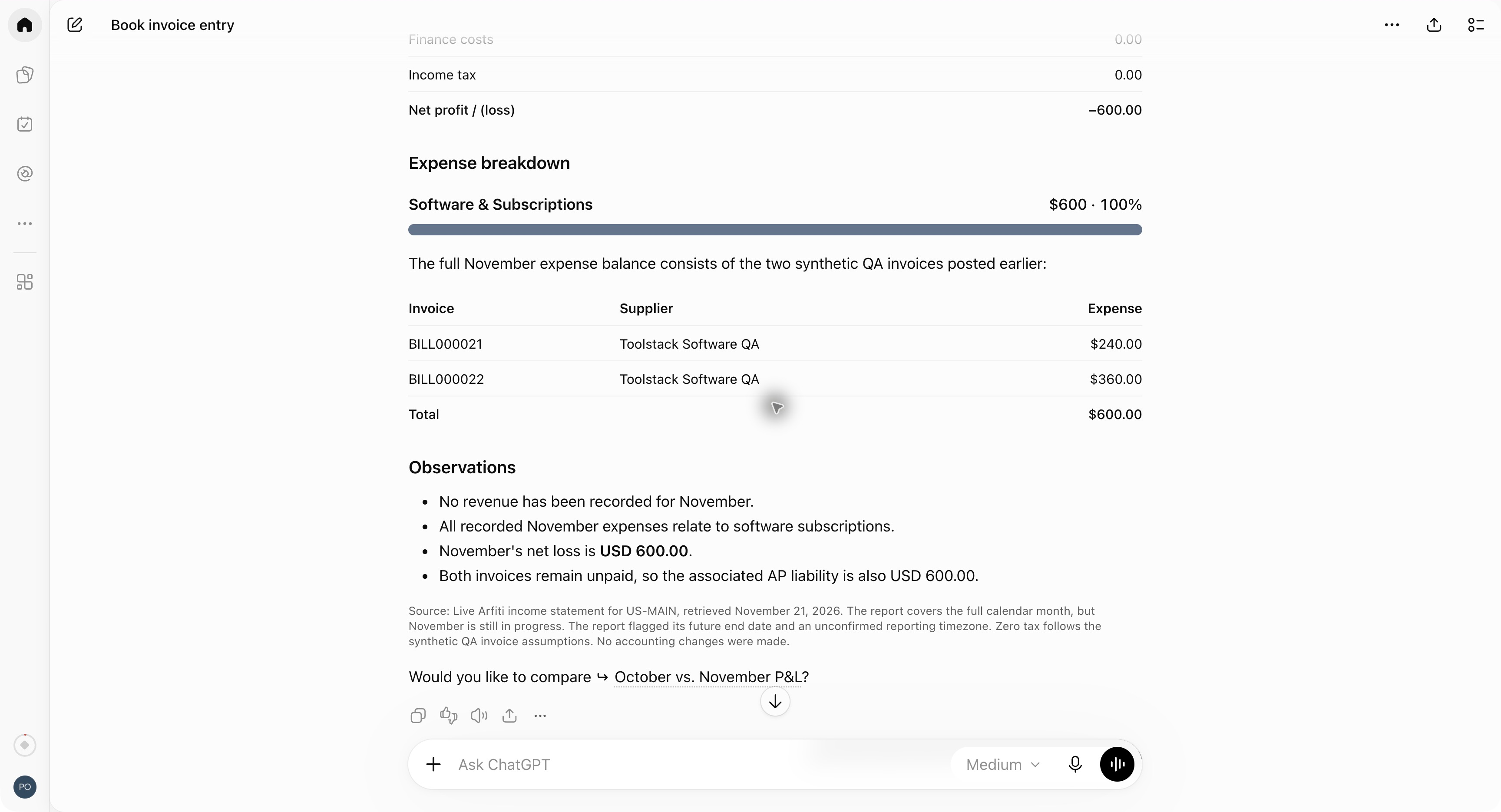
The response reported the following for the synthetic company:
| Report item | Reported value |
|---|---|
| Revenue | $0 USD |
| Software expense | $600 USD |
| Net loss | $600 USD |
This capture reflects the records available on 21 November, before the later receivables demo added customer transactions. It is not a current rerun of the company’s P&L.
The answer identified two supplier bills contributing to software expense: an earlier $240 bill and a new $360 bill. Their sum is $600.
This was an interim demonstration, observed on 21 November 2026. The requested report period was 1–30 November. The response flagged the future period end and an unconfirmed reporting timezone. These warnings limit what the report establishes: it is not a completed November close, and it is not a comparison with October.
All records in this example are synthetic. The result demonstrates a report retrieved through ChatGPT, not a customer's operating performance or a claim about reporting speed.
Check the scope before interpreting the total
A familiar report name can hide an unfamiliar selection. Before explaining a result, confirm the legal entity, currency, dates, report basis and any filters. If you asked for a month that has not ended, the answer should identify the reporting cutoff rather than implying that future activity is included.
For the demonstration above, a useful follow-up is:
What period and cutoff does this cover?
This question is particularly useful when people say “this month,” “last quarter” or “year to date.” The business date and timezone can matter near a reporting boundary. A report for one company should not quietly become a group result, and a filtered department view should not be described as the entire business.
Arfiti's reporting contract carries scope and evidence information with its amounts. The assistant should preserve relevant limitations in the response. An unavailable amount should remain unavailable; converting it to zero would create a financial assertion the source did not make.
Ask for the entries behind the expense
After checking scope, move from the statement line to its supporting entries:
Show the entries behind software expenses.
A useful answer identifies the source documents, dates, amounts and ledger accounts that contribute to the selected figure. The references should let the reviewer return to the underlying records. If a report is paginated, a short displayed list must not be presented as the complete population without checking the remaining pages.
We asked that follow-up in the same Accounting-enabled conversation. ChatGPT retrieved eight ledger lines for the software account. The gross debits were $603, the credits were $3, and the net expense was $600.
The extra movements came from three earlier synthetic one-dollar charges, each with a matching reversal. They cancel out. The two supplier bills remain as the net expense: $240 plus $360.
| Ledger movement | Effect on software expense |
|---|---|
| Two supplier bills | +$600 |
| Three earlier synthetic charges | +$3 |
| Reversals of those charges | −$3 |
| Net expense | $600 |
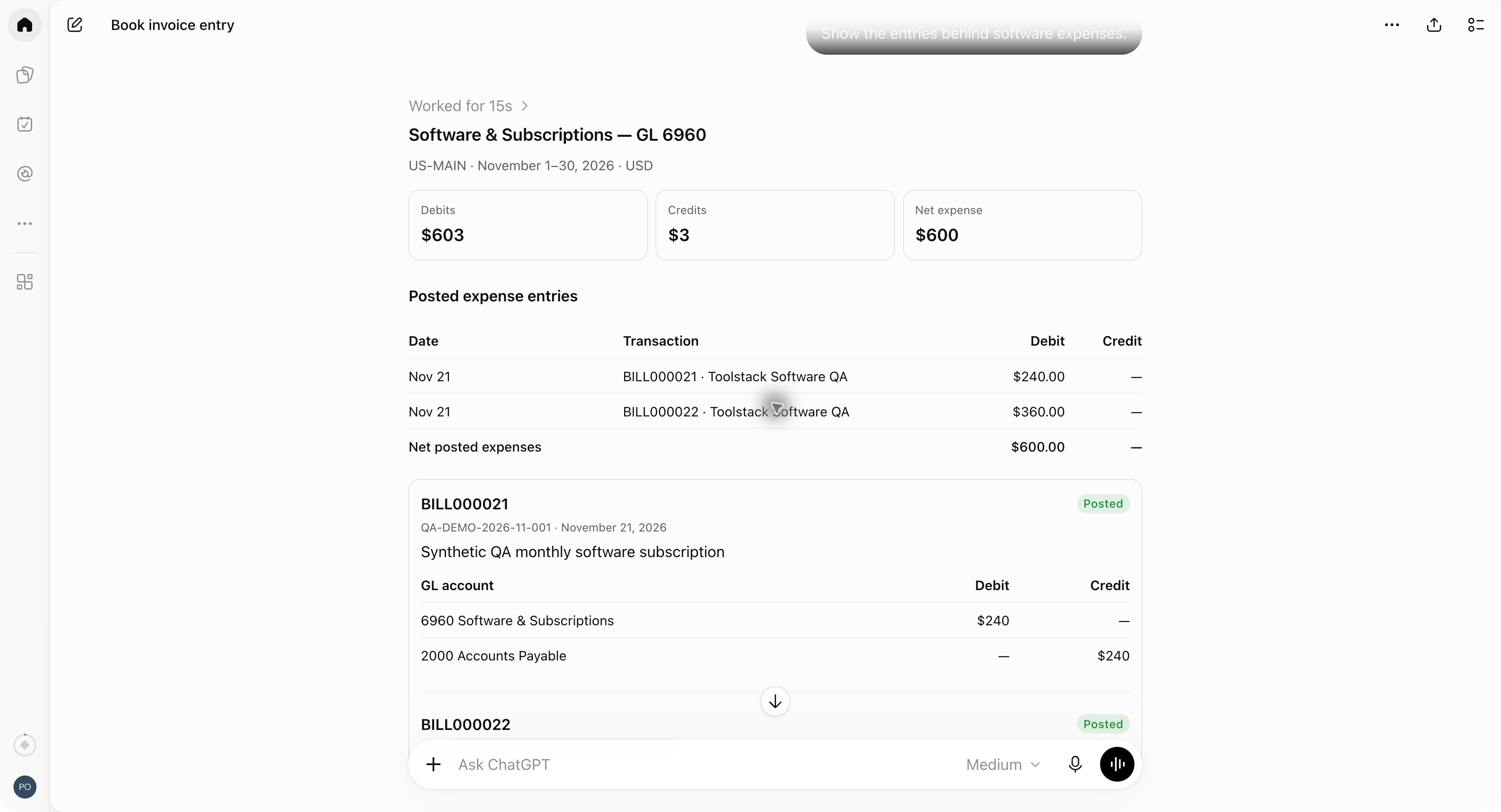
That distinction is useful accounting work. Summing only the debit lines would produce $603 and overstate the reported net expense by $3. Looking only at the final total would hide why the account contains more activity than the two bills suggest. The drill-down explains both figures without changing the books.
This exercise verified the arithmetic and the presence of offsetting entries. It did not certify every recognition decision. Checking whether a subscription belongs in this period, or should be treated as a prepaid asset, still requires the source document and the company's policy. No accounting records were changed during the reporting queries.
A comparison needs comparable periods
Suppose a hypothetical company reports $4,000 of software expense in October and $5,200 in November. The increase is $1,200, or 30% of October's amount. That calculation alone does not explain the cause.
The larger total could include new licenses, an annual invoice expensed at once, a changed allocation or a credit in the earlier period. A useful conversation proceeds in stages:
Compare software expenses with October.
Which entries explain the increase?
What still needs checking?
Ask for the original amounts and the arithmetic beside the explanation. Confirm that both months use the same entity, currency, accounting basis and filters. Comparing a partial month against a full month can be useful, but the difference must be labeled. It should not be described as a like-for-like trend.
This comparison is a proposed use case, not a result from our demonstration. Our synthetic report does not establish any month-on-month increase.
Separate observations from business explanations
An observation might be: two subscription invoices account for the selected expense balance. A business explanation might be: the team bought more seats. The second statement needs contract, invoice or operational evidence.
The Accounting skill asks for supporting references and explicit assumptions. In practice, the answer should distinguish a verified document description from an inference. If a bill says “three seats,” that describes the bill. It does not establish that headcount grew, that the seats were used, or that the purchase was commercially justified.
This distinction improves management discussions. Instead of debating an unsupported story, the reviewer can see which part is established and which question requires an owner. It also makes a report easier to hand over: the next person can inspect the same documents rather than reconstructing the conversation.
Keep reporting separate from correcting the books
Finding an unusual expense does not authorize changing it. First review the source document, recognition period, account selection and applicable policy. A correction should have an explicit rationale and follow the connected system's permitted workflow.
A reporting conversation can remain entirely read-only. Ask for a review list with the source reference, amount, reason for concern and evidence still needed. That is a useful deliverable even before anyone decides whether an entry is wrong.
If an authorized correction is later made, retrieve the report again and show what changed. Keep the original issue, corrective action and subsequent result distinguishable. A newly balanced report is not proof that every underlying classification is correct.
Make your first reporting question specific
Choose one management question with a clear owner: what makes up a large expense, why a margin moved, or which entries explain a balance. Start with one legal entity and an explicit reporting period. Use the first result to select a focused drill-down.
OpenAI's Accounting plugin page describes reporting and audit use cases. The Arfiti for ChatGPT guide explains the connection needed for company records.
To try a reporting workflow with your finance team, request access to Arfiti. Tell us which report you want to investigate and which source system holds the entries behind it.