Book a supplier invoice in ChatGPT Accounting plugin
Three prompts take a synthetic supplier invoice through review and posting, then retrieve the supplier's outstanding balance. See the actual ChatGPT workflow.
Upload the invoice. Ask ChatGPT to book it. Review the proposed entry, confirm it, then ask what you owe the supplier.
We recorded that sequence using the ChatGPT Accounting plugin and a connected Arfiti demonstration company. The new invoice was $360. After confirmation, ChatGPT retrieved a supplier balance of $600, including an earlier $240 bill.
The three prompts were:
Book this invoice.
Looks good, confirm it.
What do we owe this supplier now?
The screenshots below are frames from that recording. All company and invoice data in this example are synthetic.
Why this is a useful first accounting workflow
An invoice arrives as a document, but the work does not end with reading its total. Someone must identify the supplier, check for an existing bill, choose the accounting treatment, review the proposed entry and establish what is now owed. Those questions belong together.
In this example, the conversation carries the invoice through that sequence. The person can move from the document to a posting proposal and then to a question about the supplier's account without opening the Arfiti administration interface. The connected accounting system holds the records and executes the supported actions.
For an accountant, the useful outcome is a bill you can trace back to its source and a balance you can explain. It shows the actual steps and the evidence available for checking them.
Start with the invoice and the right connection
The PDF was an invoice from TOOLSTACK SOFTWARE QA to Artifi QA US Operations LLC. It covered three seats of a team software subscription for November 2026.
| Invoice detail | Value |
|---|---|
| Invoice reference | QA-DEMO-2026-11-002 |
| Invoice date | 21 November 2026 |
| Due date | 21 December 2026 |
| Subscription | 3 seats × $120 |
| Total | $360 USD |
The document explicitly says it is demonstration data and is not payable. Its zero-tax treatment is a fixture assumption for this example, not guidance for your invoices.
Accounting and the Arfiti QA connection were available in the conversation before the invoice was submitted. Accounting supplies task guidance; the connection supplies access to the company's records and supported actions. OpenAI describes the plugin’s skill and app connections in its Accounting plugin listing.
For your own first session, verify the selected company and connection before submitting an invoice. The Arfiti for ChatGPT guide explains the connection approach. A plugin installation alone does not establish access to your ledger.
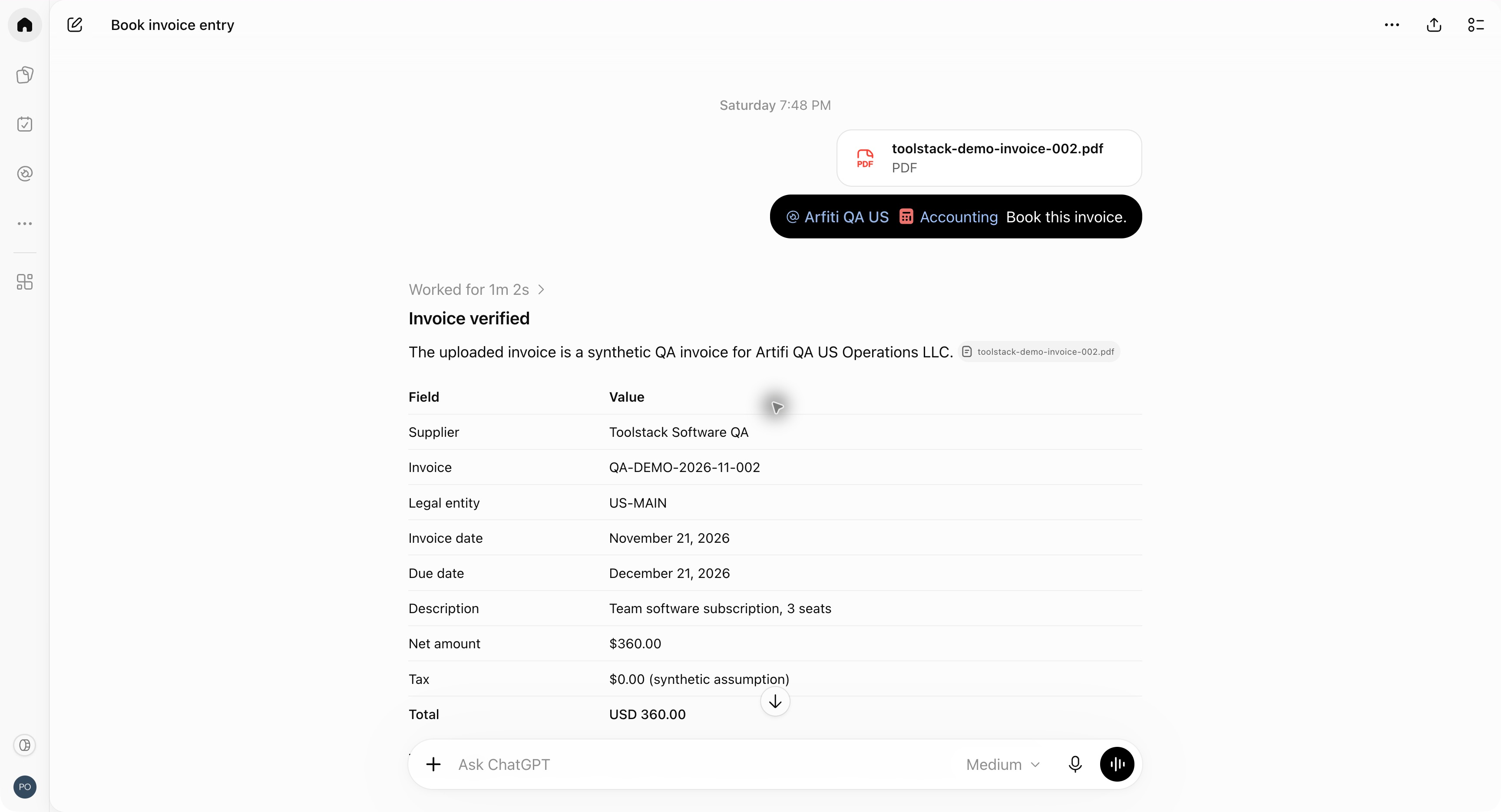
“Book this invoice.”
The first prompt was deliberately short. The document supplied the invoice details, and the connected system supplied the accounting context.
ChatGPT prepared the entry and paused at a pending review task. For this demonstration, the posting workflow had been configured to require the submitter's confirmation for this kind of invoice.
That pause is where the person checks the company, supplier, invoice reference, date, amount and proposed accounts. Any missing information or incorrect coding should be resolved before confirming the task.
The Accounting skill's instructions call for source inspection and duplicate checks before adding records. In the recording, ChatGPT extracted the invoice details and reported its duplicate check before presenting the task. A recurring supplier invoice deserves that attention: a familiar vendor and amount alone do not establish whether this month's bill is new.
Coding also needs context. This fixture is a November software subscription. A different invoice might cover several months, contain multiple types of expense or require a different tax treatment. Ask for the basis of the proposed coding if it is unclear. The chart and policy should inform the proposal, rather than a generic account label deciding the treatment.
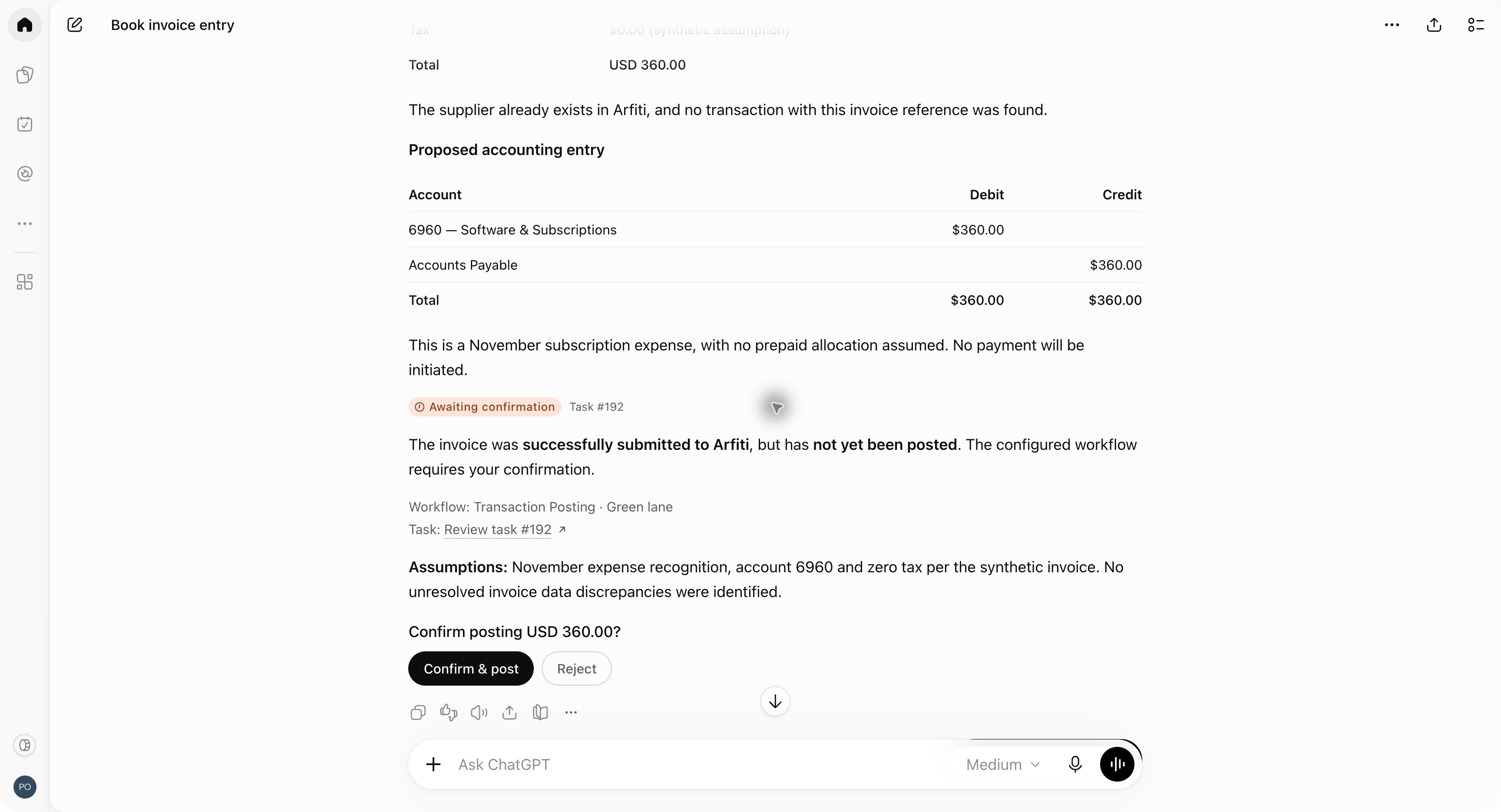
“Looks good, confirm it.”
The same person reviewed the proposal and sent the confirmation. The resulting bill was BILL000022, for $360 USD.
The recorded posting was:
| Ledger line | Debit | Credit |
|---|---|---|
| 6960 · Software & Subscriptions | $360.00 | — |
| 2000 · Accounts Payable | — | $360.00 |
| Total | $360.00 | $360.00 |
Those account numbers belong to this demonstration company's chart. Your coding depends on your chart, the source document and your accounting policy.
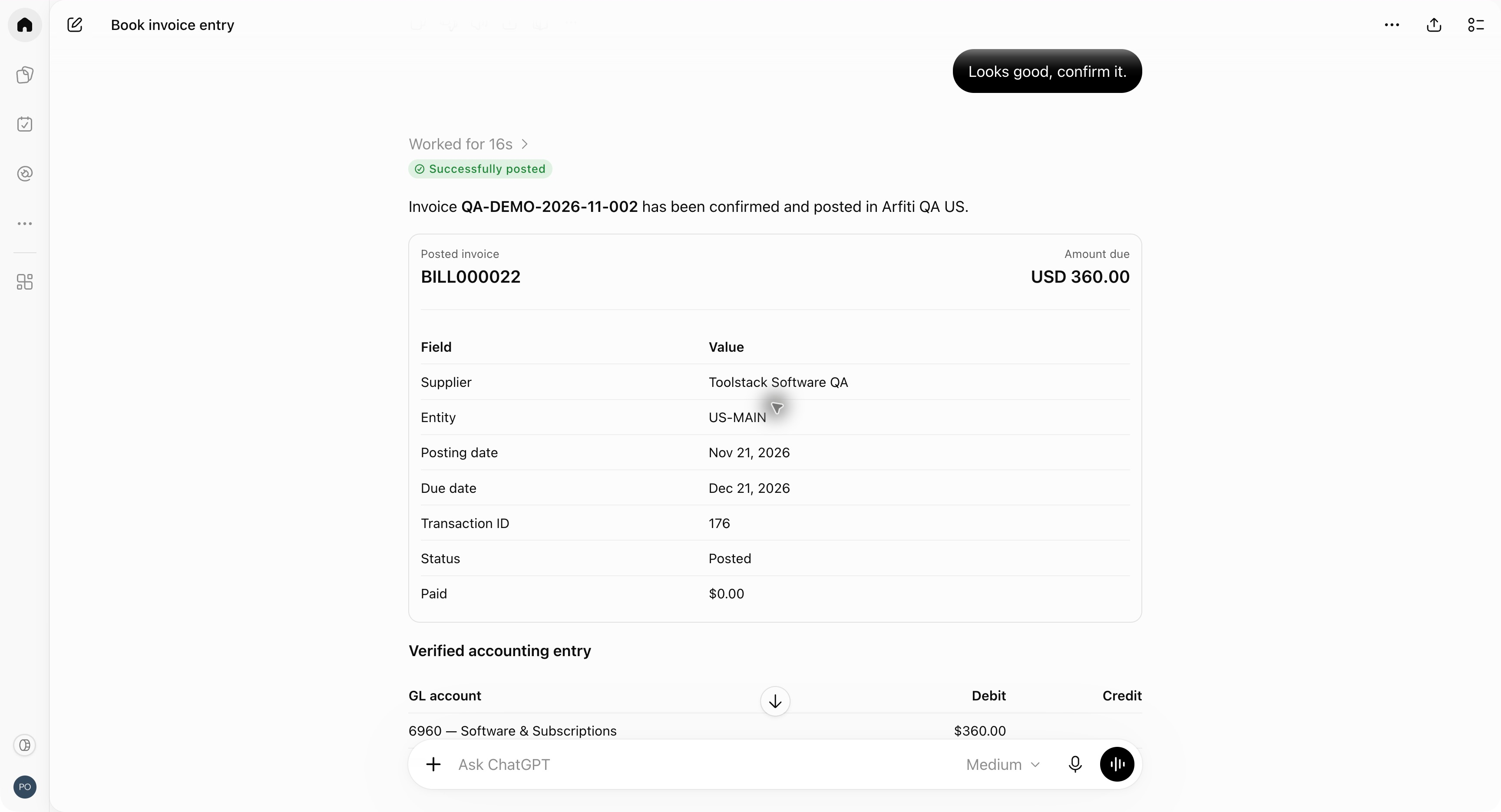
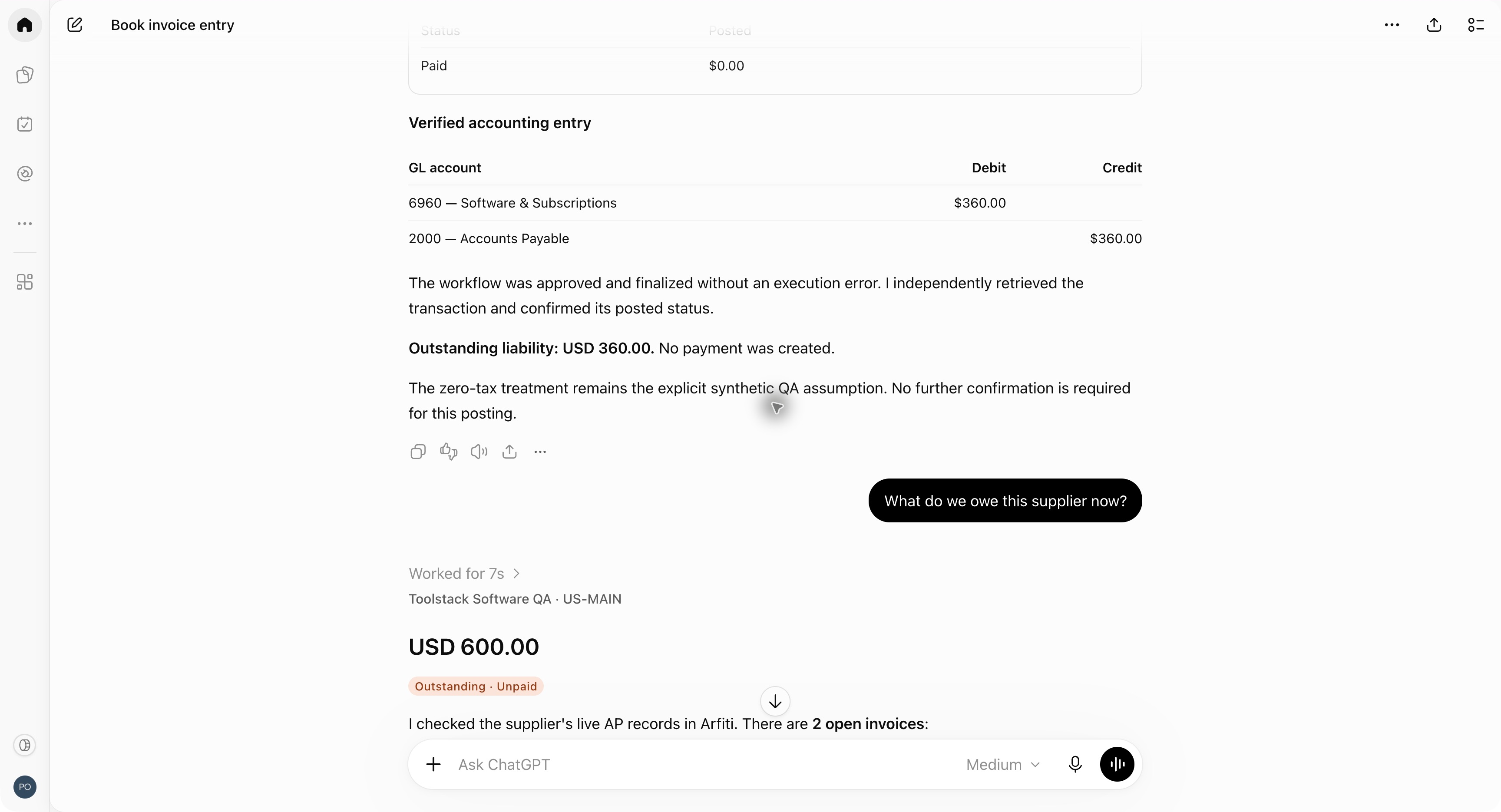
The distinction matters: the conversation first showed a pending task, then a confirmed posting. This example demonstrates same-person review and confirmation. It does not demonstrate independent approval by a second person.
Booking the bill records an amount owed to the supplier. It does not send the supplier a payment.
The follow-up read of the posted entry is part of the demonstration. It lets you compare the saved amount and accounts with the proposal you confirmed. If a confirmation response is interrupted or the status is unclear, retrieve the existing task or bill before asking to book the invoice again. That keeps the next decision tied to the saved state.
“What do we owe this supplier now?”
The next question tested the result in the context of the supplier's account.
ChatGPT retrieved $600 outstanding, made up of two bills:
| Bill | Outstanding amount | Due date |
|---|---|---|
| BILL000021 | $240.00 USD | 21 December 2026 |
| BILL000022 | $360.00 USD | 21 December 2026 |
| Total owed | $600.00 USD |
The earlier $240 bill was already in the demonstration company. The $360 invoice from this recording was added to that balance.
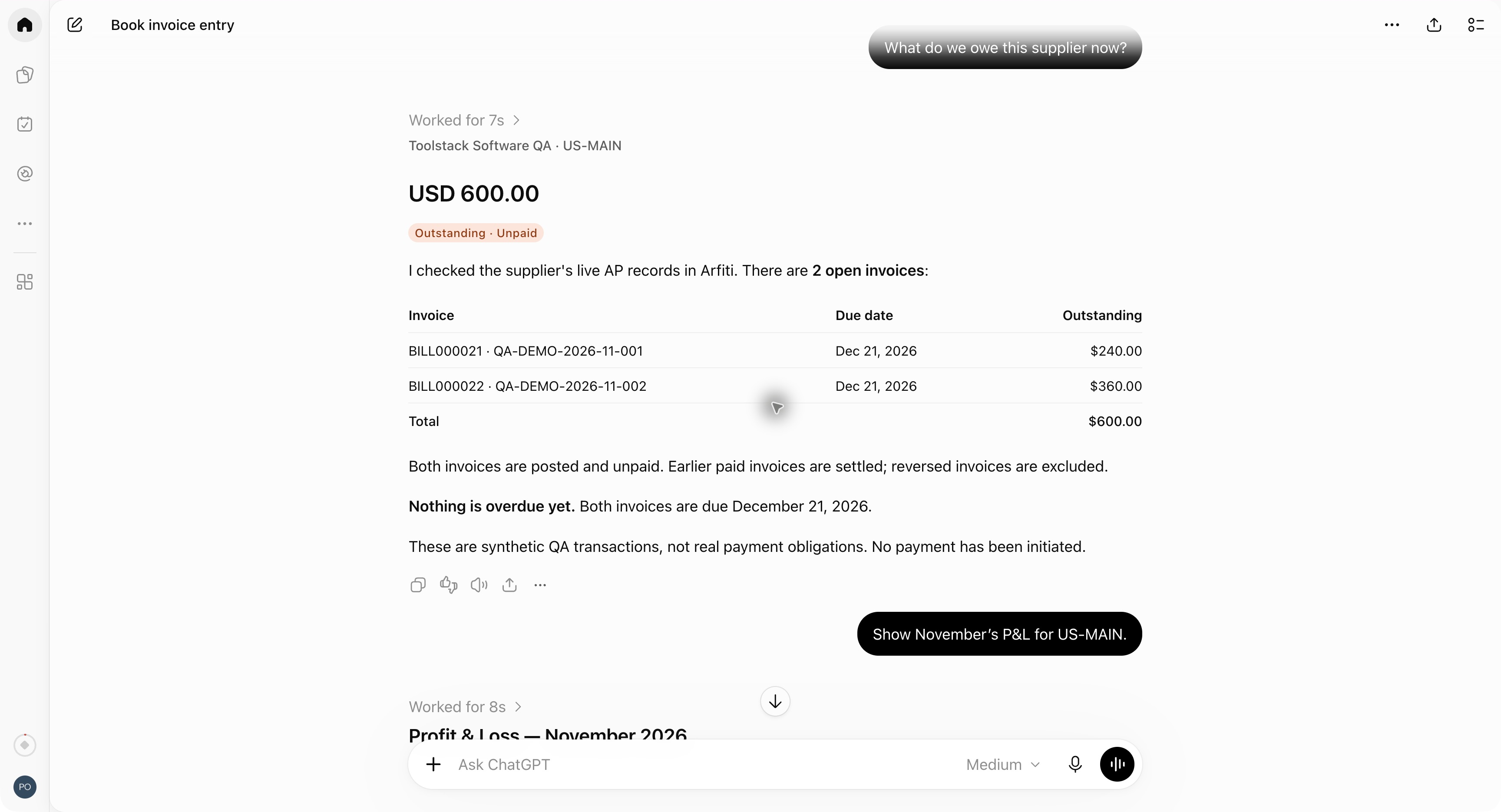
This follow-up is useful because it moves beyond the posting confirmation. The answer shows the new bill alongside an existing obligation, with a total you can check: $240 + $360 = $600.
The due dates add another useful distinction. The answer shows an outstanding obligation; it does not say that the whole balance is overdue or authorize a payment run. In this demonstration both bills were due on 21 December. The rows let the person check what makes up the total and decide what question to ask next.
For a real supplier, that next question could concern credits, payments or the particular bills due in a chosen week. Keep the same company, currency and as-of date throughout the comparison. If the assistant cannot retrieve part of the supplier account, resolve that gap before treating its answer as complete.
Use the workflow with your own records
Start with one invoice: upload it, review the coding, confirm the entry, and ask for the supplier balance. The connection and review rules determine which actions are available for your company.
To try this workflow with your team, request access to Arfiti. Tell us which invoice process you want to run in ChatGPT and which system holds your accounting records.