How to use the ChatGPT Accounting plugin with connected records
A practical first session with ChatGPT Accounting: select the plugin, connect your accounting system, and confirm which company you are working with.
An accountant may start with a supplier invoice, a bank statement or a question about an expense balance. The ChatGPT Accounting plugin helps frame that work around the source records, the accounting treatment and the evidence needed to review an answer. Before putting it to work, establish which company it can access.
We tested that first step in ChatGPT with Arfiti's US demonstration company. The conversation returned the company name, legal entity and USD base currency from the connection. We asked it to inspect only; the test did not create a transaction or post an entry.
This guide shows the setup and connection check, with real ChatGPT screenshots. It also explains what you need to verify before asking for reports or preparing entries.
What the Accounting plugin adds
OpenAI's Accounting plugin includes an Accounting skill and works with connected apps. The skill guides accounting work; a connected app supplies the records and supported actions. Installing Accounting and connecting your company's records are separate steps. OpenAI's Accounting listing
In this walkthrough, those pieces are:
| Piece | What it does in the example |
|---|---|
| ChatGPT | The conversation where you ask questions and inspect the answer |
| Accounting | Guidance for approaching and reviewing accounting work |
| Arfiti connection | Access to the demonstration company's accounting system under the signed-in user's permissions |
Arfiti is an independent accounting platform connected to ChatGPT. The custom Arfiti connection shown here is separate from OpenAI's list of included Accounting apps.
Why the skill matters to an accountant
The useful part is the approach to the work. The installed Accounting skill tells the assistant to inspect source records, support totals with underlying items, explain assumptions and identify missing information. It calls for duplicate checks before adding records and for company policy to be checked before treating an unusual entry as an error.
That gives you a practical way to judge an answer. A supplier balance should come with the bills that make it up. A variance explanation should identify the transactions behind the movement. A proposed correction should explain the accounting effect and the source of the discrepancy. A fluent paragraph alone is not a completed accounting review.
The skill also covers reconciliation, reporting, expenses and close-related work. Its instructions are broader than any one connection's available tools. Choose a task your connection can support, and ask for evidence you can check. Your accounting judgment, company policy and permissions still determine the appropriate action.
1. Find Accounting in your workspace
Open ChatGPT's plugin directory and find Accounting, developed by OpenAI. Install it if your workspace permits it. OpenAI's setup instructions describe the desktop route; the screenshots in this walkthrough come from the ChatGPT web workspace we tested. Availability and controls can differ by workspace. OpenAI's setup guide
Our installed listing showed version 1.0.1, an Accounting skill, and a Try in chat button.
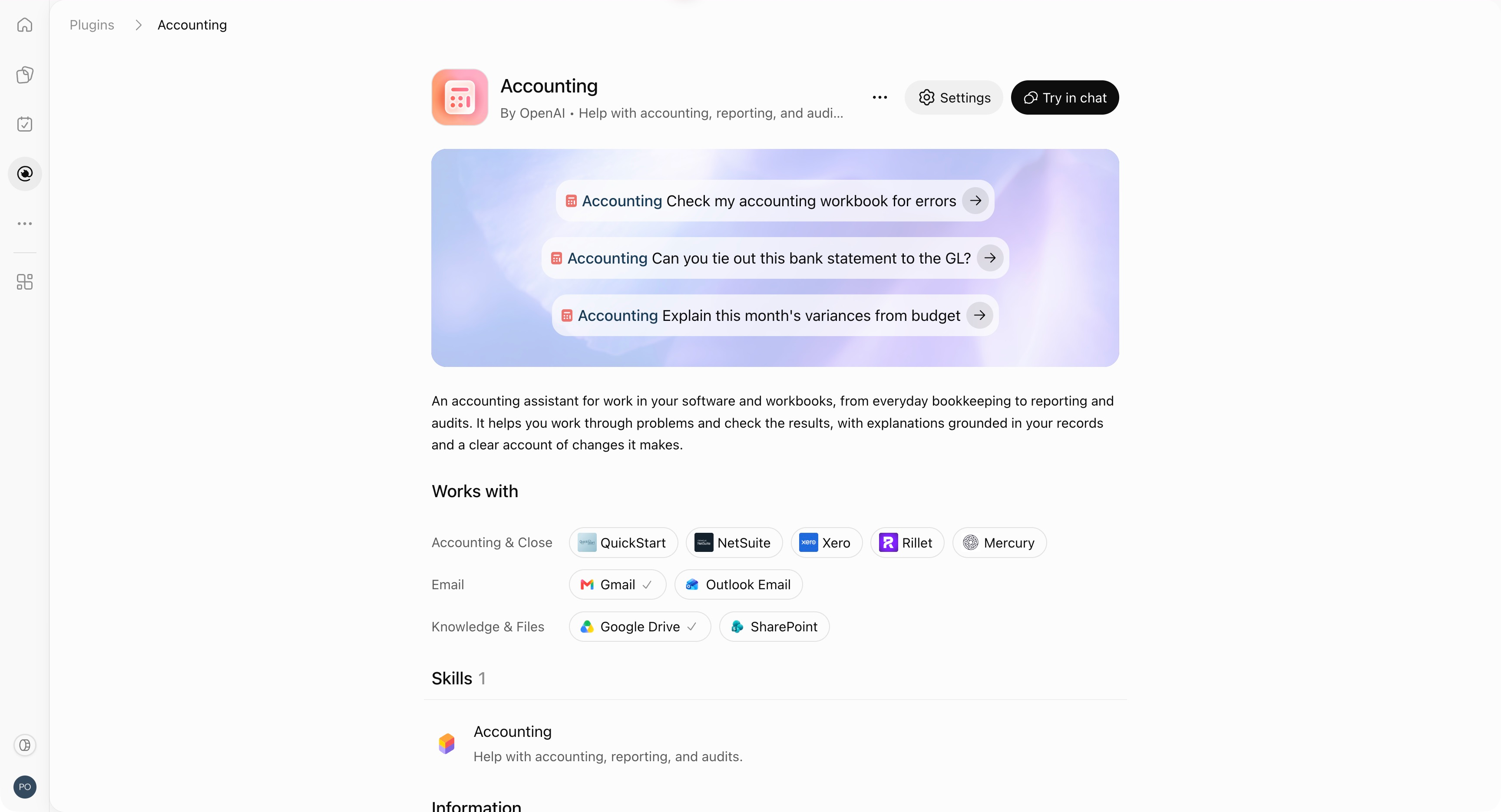
Choose Try in chat to start a conversation. Keep your first task small enough that you can check every part of the answer.
2. Connect the accounting system you intend to use
Decide where the source records will come from. For a file-based review, that may be an authorized statement or workbook you upload. For live company records, use the relevant app connection.
For the Arfiti example, we added a custom MCP connection and completed OAuth sign-in. Use the connection details supplied for your own Arfiti organization. Sign in through the authorization screen and check the account and permissions presented there. Keep credentials out of the conversation.
If your ChatGPT workspace exposes Add custom MCP, use that route for your organization's supplied connection. If it does not, follow your workspace's supported setup or ask its administrator. The Arfiti for ChatGPT guide explains the connection approach.
A connection can support different actions under different permissions. The ability to read company information does not establish permission to enter invoices, approve tasks or post journals. Check the action you intend to use rather than assuming every connected system behaves the same way.
3. Confirm the company before asking about its finances
Start a fresh conversation and select or mention the intended connection. In our example, it was labelled Arfiti QA US.
For an everyday first check, a short question is enough to start:
Which company am I connected to?
Our recorded setup check used a more detailed request for the organization, legal entity and base currency. The screenshot below shows that original exchange; the short prompt above is a suggested way to begin.
Replace the demonstration entity with your own intended company or entity. Asking for live evidence matters: the assistant should retrieve the answer through the connection, rather than repeat a company name from earlier conversation text.
Our ChatGPT session returned:
| Field | Result in the demonstration |
|---|---|
| Organization | Artifi US QA — October 2026 |
| Legal entity | Artifi QA US Operations LLC |
| Entity code | US-MAIN |
| Base currency | USD |
| Country | United States |
These names identify a demonstration environment. They are not a customer case study.
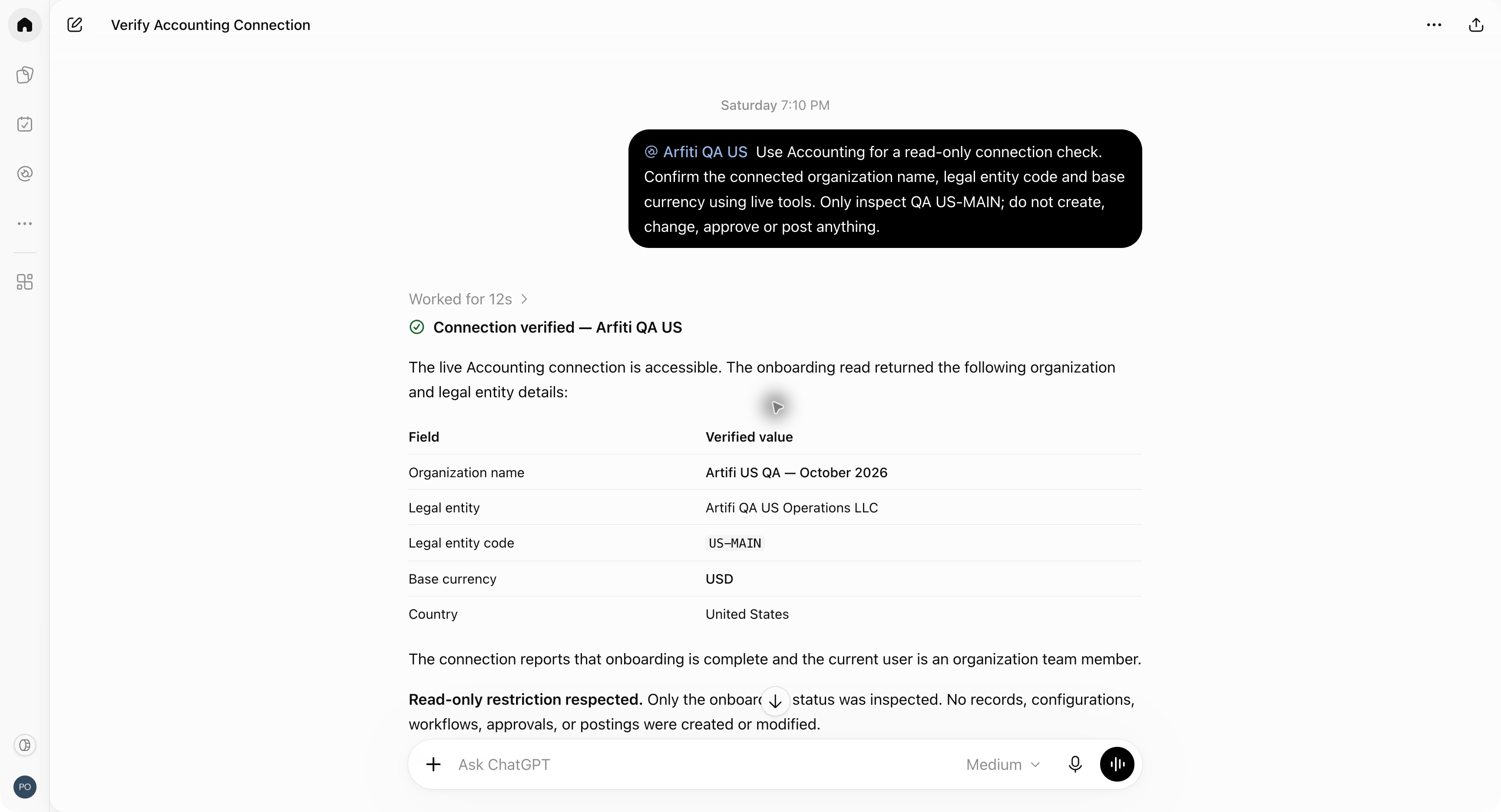
Compare the answer with the company you intended to use. For a finance team managing several entities, this is a useful check at the start of each new task. A familiar company name in an old message is not enough to establish the current connection.
4. Give the next question a company, a period and an output
Once the connection is verified, specify the work you want it to perform. Include the legal entity, date range or as-of date, and the evidence you want with the answer.
For example, a next read-only request could be:
Which bills are due next week for US-MAIN?
If the date range is unclear, specify it in a follow-up. Then ask:
Show me the bills behind that total.
This is a suggested next prompt, not a result demonstrated by the screenshots above. Use the dates and entity relevant to your own review.
A good first answer is easy to inspect. Check one invoice against its source, confirm the date filter, and make sure the total uses the same currency and scope as the rows. If a result is incomplete, ask what was omitted before treating it as a complete worklist.
For reporting, use the same structure: company, period, comparison basis and sources. For reconciliation, provide both sides of the comparison and ask for unmatched items separately. OpenAI's guide includes examples of these tasks. Accounting use cases
When you move from reading to preparing an entry
Preparing a proposal, confirming it and seeing it saved are distinct steps. Before trying a posting workflow, establish what the connection supports and what your company's rules require.
For a reviewed entry, the conversation should make the source document, amount, accounts, entity and posting date clear. If a workflow returns a pending task, inspect the exact proposal before confirming it. After any approved action, retrieve the saved record to check the result.
This walkthrough proves the read-only connection step. In a separate invoice demonstration, we also recorded a pending review task, confirmation, a saved bill and a subsequent supplier-balance query. That is the next useful test once your connection and review rules are established.
If the connection is missing
We encountered this during the walkthrough: Accounting was installed, but the first web conversation could not access the QA connection. We checked the workspace's connections, added the intended custom connection, completed sign-in, and repeated the read-only check in a new conversation.
If you see the same problem, check:
- The workspace selected in ChatGPT.
- Whether the required connection is installed and signed in there.
- Whether the current conversation has access to it.
- Whether the signed-in account can access the intended company and action.
Ask ChatGPT to state what it can actually retrieve. An honest “connection unavailable” is a useful setup result; it tells you to resolve access before relying on an answer about the books.
Try the first connection check with your team
Choose one company and one read-only question. Confirm its scope, inspect the answer and follow the source references before expanding the task.
To try this approach with Arfiti, request access to a connected finance walkthrough. Tell us which accounting task you want to work through in ChatGPT and which system holds your records.