Your first accounting task
Check your connected company, request a scoped report and inspect the entries behind one figure.
Start with a read-only task whose answer you can compare with your books. A report and one follow-up question are enough to check that the connection returns useful evidence.
Before you start
Complete the ChatGPT quick start. Choose an entity and period containing records you recognize. You need access to both the report and the underlying entries; access to one does not guarantee the other.
1. Check the company
Which company am I connected to?
Check the organization, legal entity and accounting currency. If several entities are available, select the intended entity explicitly. Do this again when switching clients or connections.
2. Ask for one report
Show November 2026's P&L for US-MAIN.
Replace the example month and entity with yours. Check the returned start/end dates, reporting currency and whether the period is complete. Our November demonstration was an interim synthetic report, not a closed month.
The saved QA records produced $600 of software expense and a $600 loss, with no revenue. Your result should reflect your records; the example amount is not a setup target.
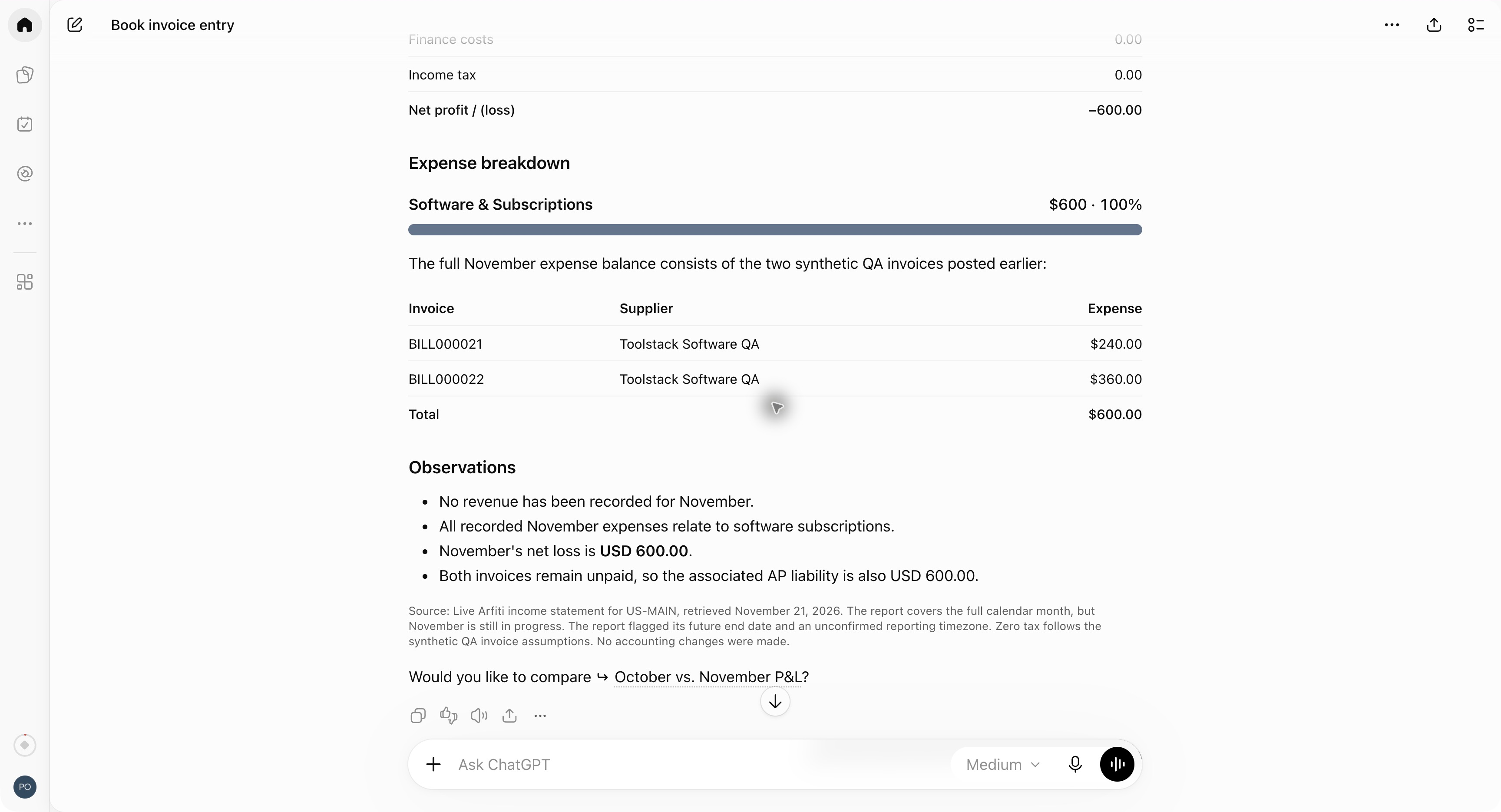
Genuine ChatGPT capture. The response includes scope warnings; resolve equivalent warnings for your company before relying on a report.
3. Follow a figure to its records
Show the entries behind software expenses.
Compare the entries with the report total. Include credits and reversals rather than adding only debit lines. In our case, $603 of debits less $3 of credits explained $600 net expense.
Check your result
You should have a report for the intended entity and period, a traceable set of entries and a total you can reproduce. If access is denied or data is incomplete, keep that limitation visible. An unavailable result is not zero.
This exercise changes no accounting records. Continue with reporting and drill-down for a fuller review, or book a supplier invoice when you are ready to review a supported write workflow.
Evidence reviewed 23 November 2026. Screenshots show genuine ChatGPT interactions with synthetic demonstration data. Suggested prompts may differ from the recorded exchange.