Book a supplier invoice in ChatGPT
Prepare a supplier invoice, review its task, confirm the entry and verify the saved bill and supplier balance.
This tutorial follows a real ChatGPT interaction with synthetic Arfiti records: an uploaded $360 invoice became a posted bill after the same person reviewed and confirmed it. Booking a bill records an obligation; it does not send a payment.
Before you start
Connect Accounting and Arfiti using the quick start. Confirm your company, invoice permissions and applicable workflow. Our demo's invoice workflow required a review pause. Other configurations may execute an authorized request immediately; a sentence in chat does not configure that control.
Use an invoice you are authorized to process. Check the source, accounting period and company coding policy. The example invoice covered three November software seats at $120 each. Zero tax was a synthetic fixture assumption, not a rule for your invoices.
1. Upload and prepare the invoice
With the review workflow established, our recorded prompt was:
Book this invoice.
ChatGPT extracted the document details, reported a duplicate check and presented a pending task. If you want only a proposal, say “Prepare this invoice for review” and inspect what the system actually returns.
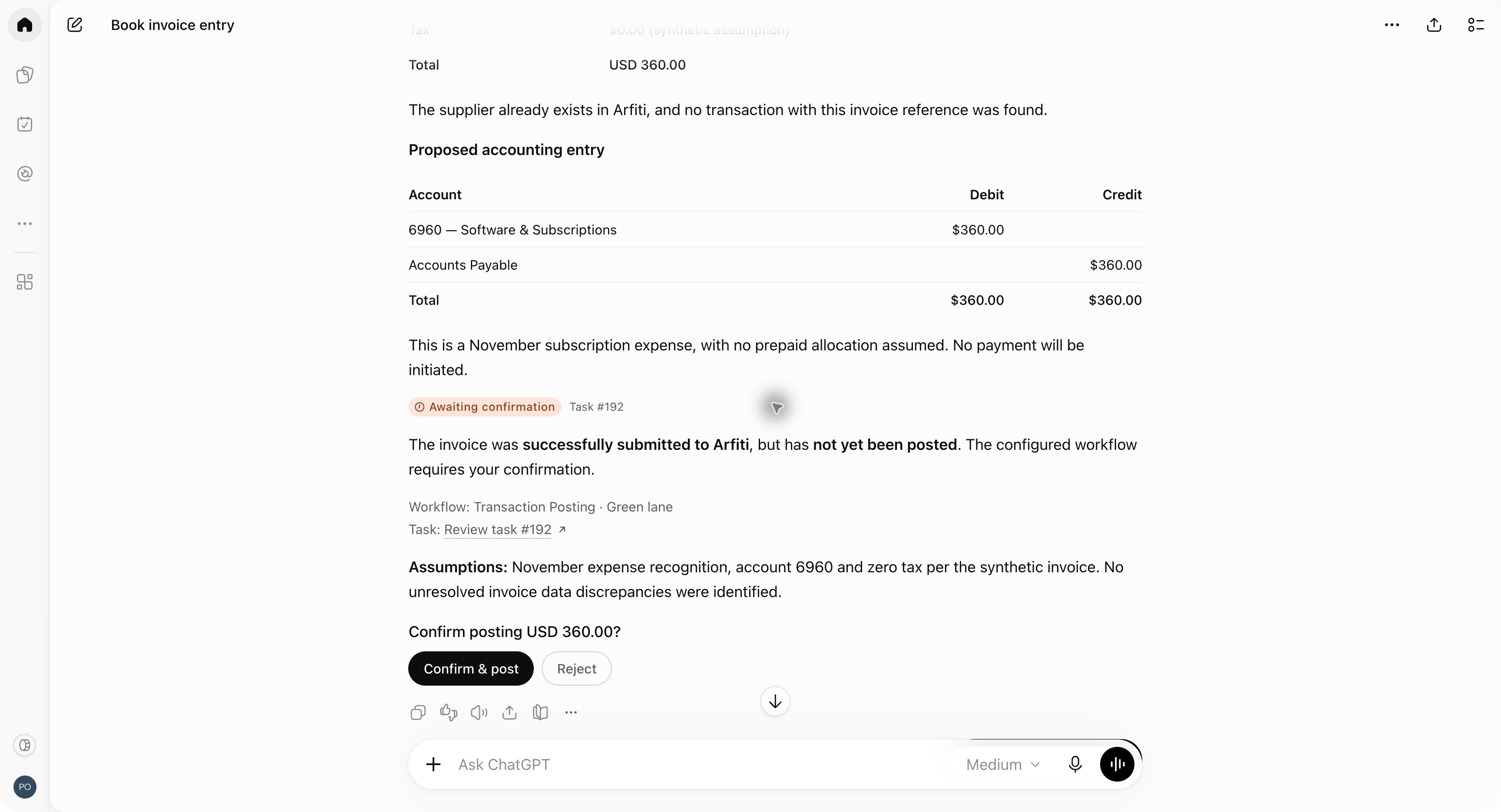
Review the supplier, invoice reference, entity, invoice and accounting dates, currency, amount, tax and proposed accounts. Ask about any missing information or duplicate candidate before confirming. A familiar supplier and amount do not establish that the bill is new.
2. Confirm the reviewed task
Our next message was:
Looks good, confirm it.
Use a short confirmation when the intended task is unambiguous. If several tasks are present, identify its reference. If another approver is required, have that person review it; your message cannot replace their authorization. See tasks and confirmations.
3. Retrieve the saved entry
Show the posted entry.
The demo produced BILL000022: debit Software & Subscriptions $360, credit Accounts Payable $360. Those accounts belong to the demo chart. Verify your own saved document number, status, date, amounts and accounts against the reviewed proposal.
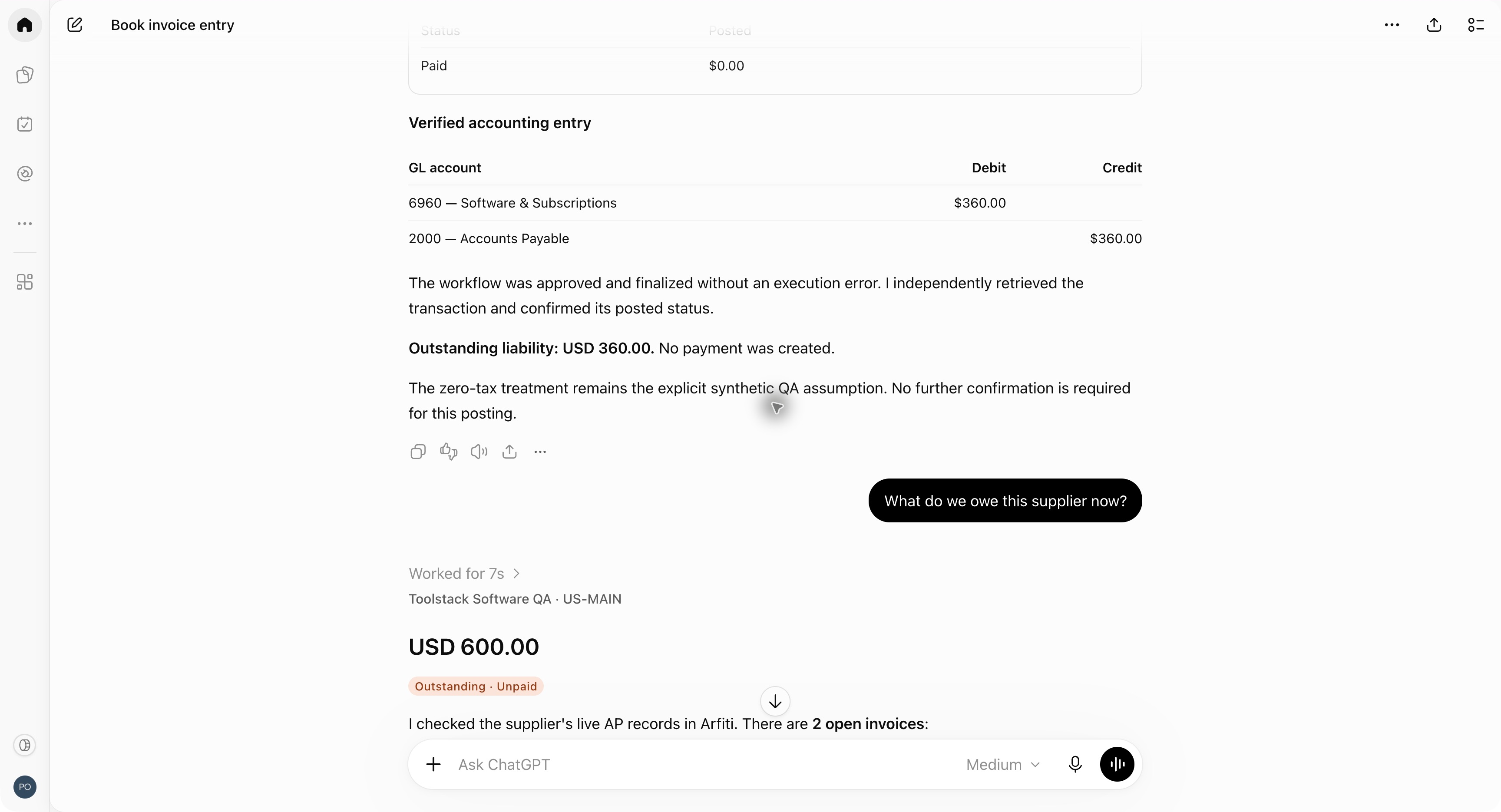
If the response is interrupted or ambiguous, retrieve the existing task and bill before requesting another submission. Do not infer success from a confirmation message alone.
4. Check the supplier balance and source
What do we owe this supplier now?
Our result was $600: the new $360 bill plus an existing $240 bill. Both were due on 21 December 2026; outstanding did not mean overdue.
Then check the original attachment. In this campaign the PDF was stored against the bill in a later repair step; the original invoice recording did not prove durable attachment storage.
The result to retain is the saved bill, its entry, the dated supplier balance and access to the source document. The full invoice demonstration includes the original conversation captures.
Evidence reviewed 23 November 2026. Screenshots show genuine ChatGPT interactions with synthetic demonstration data. Suggested prompts may differ from the recorded exchange.