Review tasks and confirm changes
Understand proposals, pending tasks, confirmations and execution results before relying on an accounting change.
A conversational “done” is not enough to establish what changed. Check the saved task and resulting record. This guide explains the stages you may encounter; these are practical descriptions, not a promise that every operation displays identical status labels.
What each stage means
| Stage | What you can conclude | What to check |
|---|---|---|
| Proposal | An action has been described; submission may not have happened | Source, scope, coding and unresolved questions |
| Pending task | A submitted action is waiting for a required step | Task reference, proposed entry and who can act |
| Confirmation or approval recorded | A review decision was recorded | Whether execution is still pending, succeeded or failed |
| Execution succeeded | The operation reports success | Retrieve the saved record and verify its effect |
| Failed, rejected or unclear | You do not yet have a verified successful result | Existing task, error and record before any retry |
An authorized operation may execute immediately under its configured workflow. Do not assume every write creates a human approval task.
Inspect the proposal
Show the pending task.
Check the entity, action, source reference, date, amounts and proposed accounts. If multiple tasks appear, choose the intended reference before continuing. If the proposal changes after your review, inspect the revised content again; do not confirm an earlier version from memory.
Confirm only within your authority
Confirm this task.
Our supplier-invoice demonstration used the same person to submit, review and confirm. It showed a recorded review pause, not an independent second-person approval. In contrast, the QA access changes required another owner or administrator. Telling ChatGPT that you approve cannot replace a system-required approver.
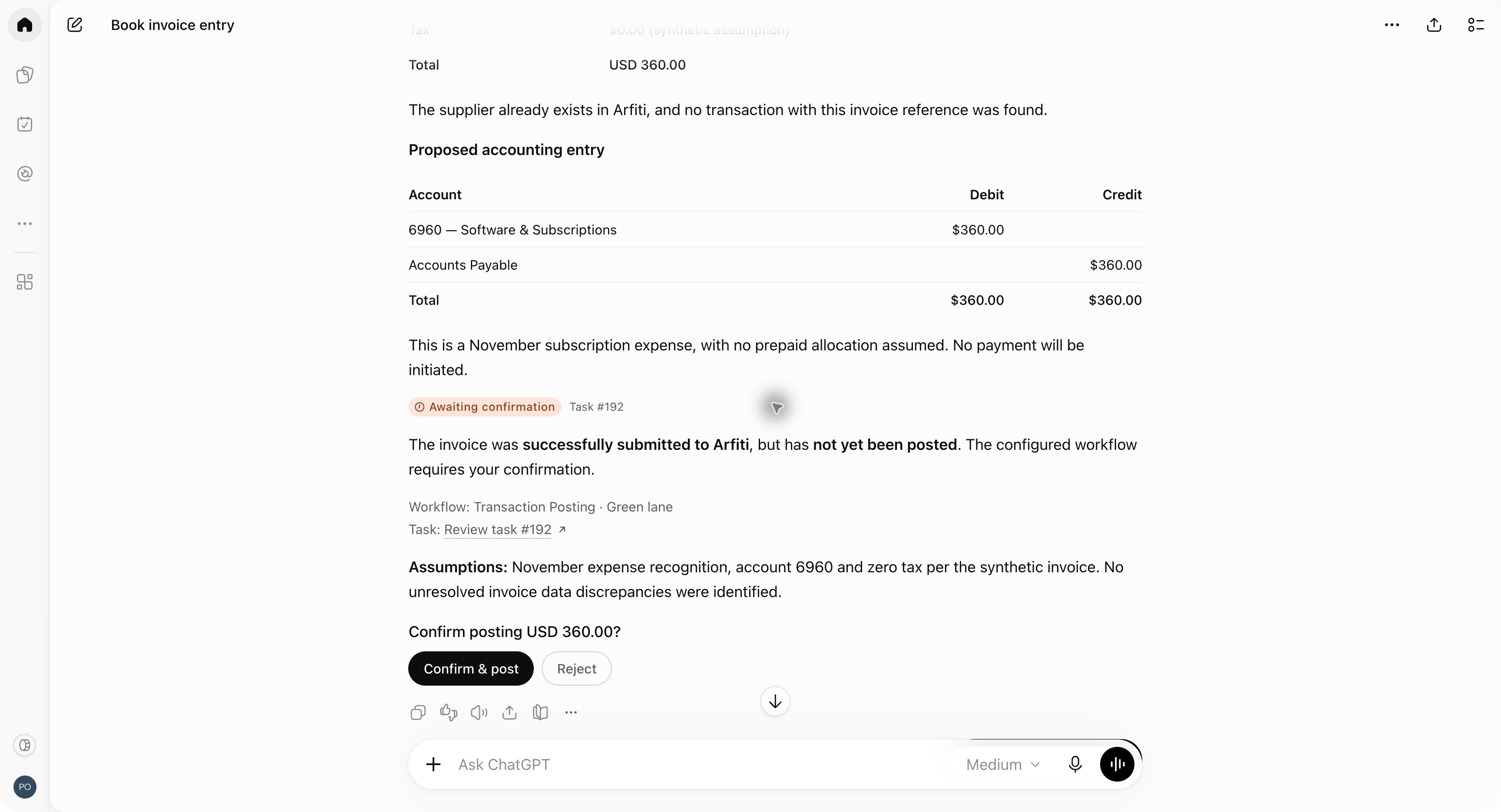
This screenshot illustrates one configured invoice workflow. It does not establish a universal approval policy.
Verify execution
Show the posted entry.
For a posting, inspect the saved document and ledger lines. For a bank match, inspect the statement line's saved link. The evidence should match the operation: a matched line is not a newly posted journal, and a posted bill is not a bank payment.
If execution fails, ask:
What happened to this task?
Read the actual reason and current record state. A permission issue needs the authorized administrator; a closed period needs a permitted accounting decision, not a silent date change. Resolve the cause before using the supported retry or correction path. If the outcome is uncertain, inspect existing records first to avoid a duplicate.
Continue with the invoice tutorial or troubleshooting.
Evidence reviewed 23 November 2026. Screenshots show genuine ChatGPT interactions with synthetic demonstration data. Suggested prompts may differ from the recorded exchange.